An operational data store gives you a current, integrated snapshot of live transactions for immediate operational decisions. A data warehouse gives you years of historical, subject-oriented data optimised for deep analytics and strategic reporting. Most mature architectures need both: the operational data store handles the "what's happening right now" questions, and the warehouse answers "what happened and why."
TL;DR:
- An operational data store requires near-real-time updates, typically under five minutes, using streaming or change data capture methods.
- A data warehouse is suited for multi-year trend analysis and complex queries, with updates occurring hours or daily through batch processing.
- Most companies need both layers eventually, but startups should pilot one based on their immediate operational decision requirements.
- Building a reliable pipeline involves focusing on critical operational processes and establishing clear data flow and retention policies first.
- Conflating application and data integration leads to incorrect tool choices; each serves distinct real-time and analytical needs, often owned by different teams.
Table of Contents
- Operational data store vs data warehouse: the core distinction
- ODS vs data warehouse: a side-by-side comparison
- When should you use an ODS, a warehouse, or both?
- How data actually moves: architecture and data flow patterns
- Application integration vs data integration: what's the real difference?
- What implementation actually costs you day to day
- Getting the two layers working together
- An Oak & Nine practitioner checklist for mapping data layers
- Why the "pick one" debate misses the point entirely
- Sources
Operational data store vs data warehouse: the core distinction
The distinction comes down to time horizon and purpose. An operational data store exists to support operational decision-making: the customer service agent checking a live order status, the warehouse manager confirming today's stock levels, the fraud system flagging a transaction seconds after it happens. It holds a current, near-real-time integrated view optimised for operational reporting, pulled together from multiple source systems and refreshed frequently, sometimes every few minutes.
A data warehouse exists for strategic analytics. It is a centralised repository optimised for large-scale structured historical data, built for subject-oriented analysis, trend detection, and the kind of complex, multi-year queries that finance and executive teams run once a quarter rather than once a minute.
The two are not competing products. An operational data store is frequently used as an intermediary or staging area where data is cleaned and consolidated before being loaded into the enterprise data warehouse. Think of it less as a rival to the warehouse and more as the warehouse's forward scout: a lighter, faster layer that catches operational reality before it gets folded into the historical record.
Where people get confused is assuming one replaces the other because both sit downstream of the same source systems. They don't overlap in function. One tells you what is true right now. The other tells you what has been true over time, and lets you build a defensible strategic narrative on top of it.
ODS vs data warehouse: a side-by-side comparison
Once you strip away the marketing language, the two systems separate cleanly across six practical dimensions.
| Dimension | Operational data store | Data warehouse |
|---|---|---|
| Primary purpose / best for | Operational decision-making, live status checks | Strategic analytics, historical trend reporting |
| Latency / freshness | Near real-time with frequent updates, sometimes streaming | Hours to daily, batch-oriented |
| Data scope | Recent operational data, subject to overwrite | Historical, spans years |
| Update model | Append or overwrite as source changes, reflecting current state | Append-only, preserves history |
| Typical queries / workloads | Simple queries on recent data | Complex joins, multi-year trend analysis |
| Governance & retention | Short retention window, lighter governance | Long retention, formal lineage and audit controls |
Each row has real cost and ownership consequences. The update model matters more than most teams realise: an ODS typically holds a shorter window of data and is often overwritten as records change, while a warehouse stays non-volatile so analysts can trust that last quarter's numbers haven't quietly shifted underneath them. Get this backwards and you either bloat your ODS with data it was never meant to carry, or you lose the audit trail your warehouse depends on.
Latency drives infrastructure choice directly. A warehouse refreshed nightly is simpler to run. An ODS requiring low-latency updates needs streaming infrastructure and appropriate operational support.
A few quick decision pointers worth pinning to the wall:
- If you need under five minutes of freshness, favour streaming or change data capture into an ODS rather than forcing a warehouse to do double duty.
- If your queries span more than a year of history, that's a warehouse job, not an ODS job.
- If governance and audit trails matter more than speed, lean warehouse.
- If the same team already owns both the source system and the reporting need, an ODS alone might suffice without touching the warehouse at all.
When should you use an ODS, a warehouse, or both?
The honest answer is that most mid-market companies eventually need both, but they rarely need both on day one.
Operational data store use cases cluster around anything time-sensitive: live operational dashboards for a call centre, real-time inventory checks before a purchase order goes out, incident response systems that need current system state, and same-day reconciliation between finance and operations.
Data warehouse use cases are the mirror image: multi-year trend analysis for board reporting, cross-year financial comparisons, feature stores feeding machine learning models, and regulatory reporting where auditors expect an unbroken historical record.
Dual deployment makes sense once query complexity and latency needs start pulling in opposite directions within the same department. A retailer, for instance, might run an ODS for live stock visibility across warehouses while feeding the same data into a warehouse for seasonal demand forecasting.
To decide what to pilot first, work through this short sequence:
- List the three decisions your teams make daily that currently rely on someone manually checking a source system.
- Measure how stale that data can be before it causes a bad decision. Under an hour usually signals an ODS need.
- Check whether anyone is already asking for multi-year comparisons or regulatory-grade audit trails; if so, consider consulting the strategic guide to enterprise-level website migrations to help plan and coordinate your implementation effectively. That's your warehouse signal.
- Pilot whichever need is causing the most visible pain today, not the one that sounds more sophisticated.
Avoid the common misconfiguration of building a warehouse first because it feels more "enterprise," then discovering operational teams are still stuck refreshing spreadsheets by hand.
How data actually moves: architecture and data flow patterns
The plumbing between source systems, an ODS, and a warehouse comes in a handful of recognisable patterns, and picking the wrong one is usually what causes projects to stall.
Change data capture (CDC) and streaming platforms give you the low-latency replication an ODS needs, capturing row-level changes from source databases as they happen. Micro-batch and scheduled ETL jobs suit higher-latency architectures where near-real-time simply isn't worth the operational overhead.
Transformation intensity differs sharply between the two layers. The ODS should apply light cleansing and business-rule enforcement, not a full transformation pipeline; heavier transformation, deduplication, and modelling belong further downstream in the warehouse load.
Architecturally, you'll encounter three common variants:
- A standalone ODS as a dedicated physical database, separate from both source systems and the warehouse.
- An ODS layer implemented inside a lakehouse, where the operational role persists even without a separate physical database.
- A virtual ODS, built through federated queries across source systems rather than physical replication.
Whichever pattern you choose, plan for schema drift from source systems, idempotent loaders so replays don't duplicate records, and a clear backfill strategy for when a pipeline fails overnight. Five integration architecture patterns worth comparing before committing to one.
Pro Tip: Build your first ODS pipeline around a single, high-value stream, such as order status, before you touch anything else. Proving idempotency and schema-drift handling on one stream is far cheaper than debugging five at once.
Application integration vs data integration: what's the real difference?
Confusing these two disciplines is one of the fastest ways to end up with the wrong tooling and the wrong owner on the hook. Application integration manages transactions and workflows in real time, keeping two or more systems synchronised so an order placed in one place reflects instantly in another. Data integration is a different job entirely: it harmonises and prepares data for analytics and governance, usually asynchronously, feeding an ODS or a warehouse rather than a live transaction.
Distinguishing the two matters because conflating them leads teams to select the wrong tooling and the wrong ownership model entirely.
Four tool classes cover most of this ground:
- CDC and replication tools for capturing row-level source changes with minimal latency.
- Streaming platforms for high-throughput, continuous event flows.
- ETL/ELT platforms for scheduled, heavier transformation into the warehouse.
- iPaaS tools for connecting SaaS applications and orchestrating real-time workflows.
Application teams typically own the integration layer; data teams own the transformation and governance layer feeding the ODS and warehouse. When evaluating any integration tool, prioritise latency, transform capabilities, connector breadth, and observability above feature lists. System integration software worth evaluating against exactly these criteria before signing a contract.
What implementation actually costs you day to day
Skipping light cleansing in the ODS feels like a shortcut until it isn't. Practitioners consistently warn that treating an ODS as a raw dump causes significant downstream debugging and quality debt, because every error that should have been caught early instead surfaces three layers downstream in a warehouse report nobody can explain.
Retention and lineage policies need to split cleanly: short retention and lighter governance in the ODS, formal lineage and long retention in the warehouse. Blurring that line either bloats your operational store or leaves your warehouse without proper audit trails.
Budget for three cost categories specifically:
- Storage costs scale differently: ODS storage stays lean by design; warehouse storage grows continuously.
- Compute cadence costs more for streaming ODS pipelines than for nightly warehouse batch jobs.
- Operational staff time goes toward monitoring ODS SLAs (query response under a set threshold) rather than warehouse job completion windows.
Pro Tip: Set an explicit SLA for ODS query response time, such as under two seconds for a status lookup, and alert on breaches. A slow ODS defeats its own purpose faster than a slow warehouse does.
Getting the two layers working together
A working pipeline follows a predictable sequence: ingest from source systems, validate and lightly cleanse, land in the ODS for operational consumption, then transform more heavily on the way into the warehouse.
Keep detailed transactional history only where you'll query it. If nobody runs year-over-year analysis against the ODS, don't bloat it with three years of records the warehouse already holds.
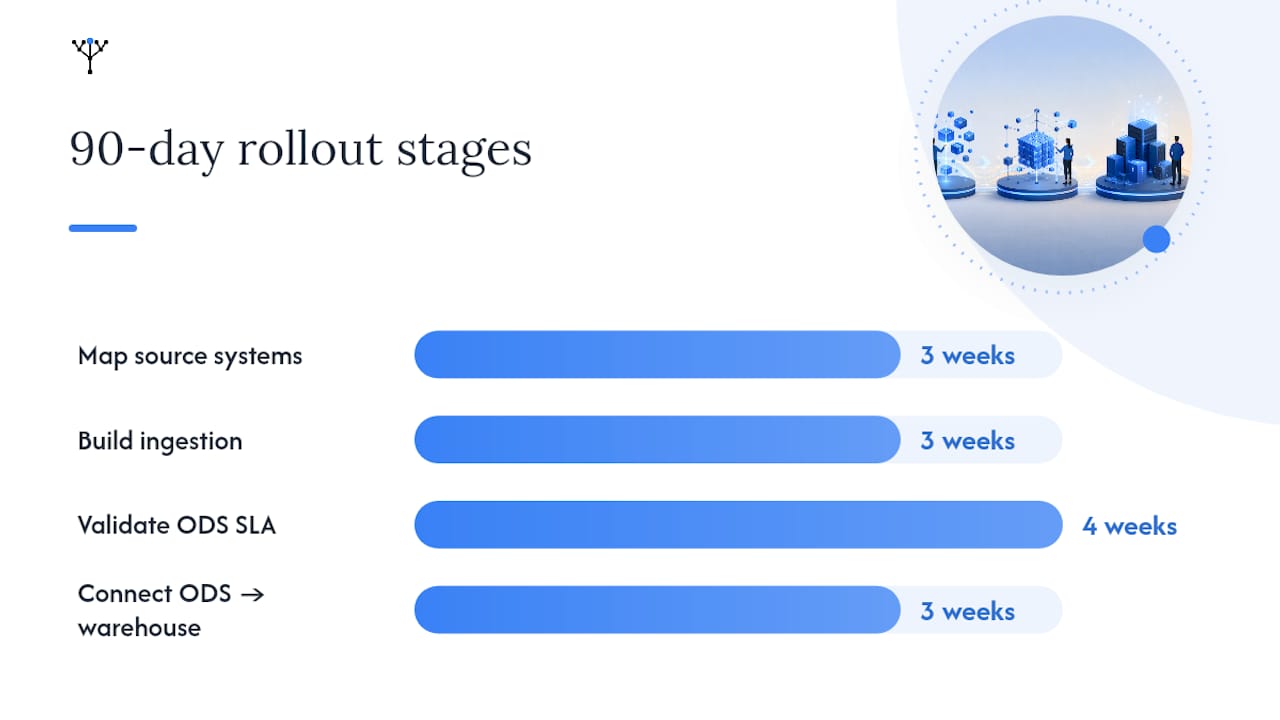
A sensible rollout for the first 90 days looks like this:
- Weeks 1 to 3: pick one critical operational stream and map its source systems.
- Weeks 4 to 6: build CDC or batch ingestion with schema-drift guards in place.
- Weeks 7 to 10: validate ODS query performance against a defined SLA.
- Weeks 11 to 13: connect the ODS to the warehouse load and confirm historical continuity.
An Oak & Nine practitioner checklist for mapping data layers
We build our platform around live organisational models, which means every operational data question starts with a process, not a schema. Before you decide what feeds an ODS, map the flows that actually break your day: order fulfilment, resource allocation, incident escalation.
Prioritise in this order:
- Identify the two or three processes where a delay of more than an hour causes real financial or operational damage.
- Pick the KPIs those processes generate: stock accuracy, ticket resolution time, cash position by department.
- Set a sampling frequency for each KPI based on how fast the underlying process actually changes, not how fast your tools allow.
- Route everything else into batch pipelines feeding the warehouse instead of forcing it through a low-latency layer it doesn't need.
Mid-market teams that skip this prioritisation step tend to build ODS layers far wider than any operational decision actually requires. Improving operational efficiency starts with narrowing that scope, not expanding it.
Why the "pick one" debate misses the point entirely
Most of the content on this topic frames operational data stores and data warehouses as a decision you make once and live with. That framing is wrong, and it costs companies real money.
The better question isn't "which one." It's "which processes in my business are bleeding value because the right people can't see what's happening fast enough, and which questions genuinely need three years of history to answer." Those are different problems with different owners, different latency requirements, and different failure modes.
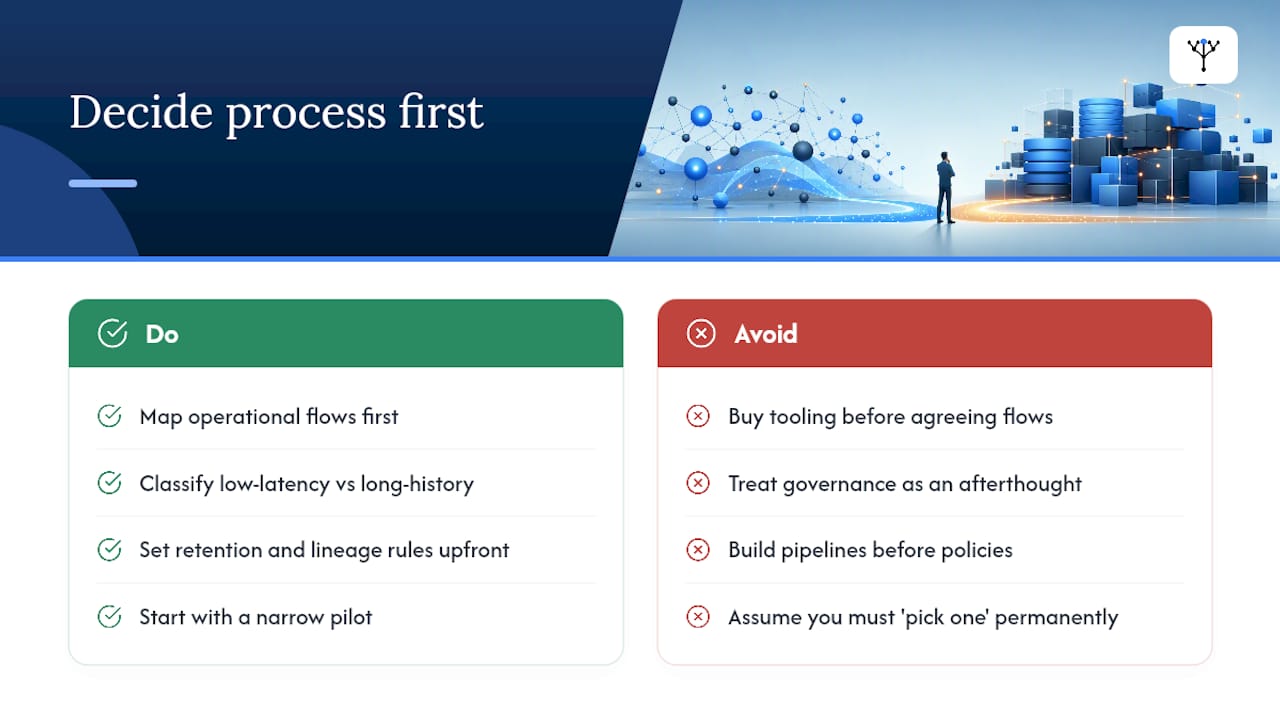
Where conventional advice falls short is treating governance and retention as an afterthought. Teams build the pipeline first and figure out lineage and retention policy later, which is precisely backwards. The staging role of an ODS only works cleanly when someone has already decided what stays, what gets overwritten, and who's accountable when the numbers between layers don't match.
Prioritise the process map before the schema. Every mid-market company we've studied that struggled with this split had already bought tooling before agreeing on which three or four operational flows actually justified the latency spend. Start narrower than feels comfortable. Widen only once the pilot proves itself.
— Ronan
Sources
The definitions and comparisons in this piece draw on a small set of vendor-neutral references worth bookmarking if you're building either layer from scratch.
- Operational data store — Wikipedia
- Operational data store (ODS) definition — TechTarget
- Data warehouse types: a complete guide to architectures and use cases — Databricks
- Application integration vs data integration explained — Domo
Ready to stop guessing which layer your operations actually need? Oak & Nine's platform for operations leaders maps your live processes to the data flows that matter, so you're building an ODS around real bottlenecks rather than a best-guess schema. If you're the one accountable for the whole picture, Oak & Nine for managing directors gives you that integrated view without waiting on a warehouse refresh cycle to tell you what already happened.